PIES Studio 1.9 · Documentation
Your agent plans, PIES writes the code: a measured comparison
If you pay for a coding agent such as Claude Code, most of what you pay for is typing. Ask the agent for a job-tracking application and it writes the schema, the API, every screen, the sign-in page and the menu, line by line, as output tokens. We wanted to know what changes when the same agent builds the same application through PIES Studio Hobby instead, sending short specs and letting PIES generate the code.
This page is the whole measurement: the brief, the method, both pairs of runs, what each build produced, the gaps we found in our own result, and how to repeat it. One run each way, so treat the numbers as a first reading, not a benchmark.
What we measured and why
Two ways of building one application with the same AI model:
- The agent writes the code itself. Claude Code in an empty folder, no tools beyond the file system and a shell.
- The agent builds through PIES. Claude Code connected to the Studio MCP server that ships inside PIES Studio Hobby (see Build with Claude, OpenAI or Cursor). The agent sends table and screen specs; PIES generates the Tables, Screens, Functions and Events and runs the application.
We recorded what the agent's own usage report says: output tokens, cache reads and writes, cost at API list price, turns and wall time.
The brief
Both runs got the same text:
Build a job tracking app: a customers table (name, phone, email, suburb), a jobs table (customer, title, status one of New/Scheduled/In progress/Done, due date, notes), list and edit screens for both, and a dashboard with job counts by status and overdue jobs. Include 8 sample customers and 20 sample jobs. Make it runnable.
Method
- Same model for every run (Claude Fable 5.1 through Claude Code 2.1), headless:
claude -p --output-format json. The JSON result carriesusage(input, cache read, cache write, output tokens),total_cost_usd,num_turnsandduration_ms. We read those fields and nothing else. - Runs were done one after the other on the same Mac, never two at once.
- Stack pinned. In the pair that matters, the plain run was told to build what PIES builds: a React front end, a Go REST backend, MySQL (never SQLite), a sign-in page with one admin user, a left menu and these seven screens: Dashboard, Customers list, Customer edit, Jobs list with a status filter, Job edit, Overdue jobs, Home.
- The PIES run used the packaged Hobby application of the day, which did not yet carry two small MCP fixes, so the prompt supplied the local user and workspace id up front, the way the released plugin now does.
- Costs are API list prices as the CLI reports them. Subscription plans do not bill per token, so cost here stands in for quota use.
- Afterwards we opened every screen of both applications ourselves and checked the counts against the database.
Results, pinned stack
| Agent writes the code | Agent builds through PIES | PIES as a share | |
|---|---|---|---|
| Output tokens | 27,297 | 11,254 | 41% |
| Cache read tokens | 554,514 | 567,016 | 102% |
| Cache write tokens | 48,108 | 53,991 | 112% |
| Cost, API list price | US$2.47 | US$1.79 | 72% |
| Agent turns | 34 | 26 | 76% |
| Agent wall time | 330 s | 142 s | 43% |
| Build step after the agent | none, the agent started both servers | 10 s incremental preview build | |
| Output tokens per turn | 803 | 433 | 54% |
Through PIES the agent wrote 41% of the output tokens, for 72% of the cost, in 43% of the time. Cache reads were the same in both runs.
Why the first comparison was unfair
Our first pair let the plain run choose any stack. It chose a 421-line Python script with SQLite and server-rendered HTML: 5 turns, 11,044 output tokens, US$1.05, 143 seconds, and it worked. The PIES run of that pair took 24 turns, 14,731 output tokens and US$2.12, and its preview was blocked by one widget the agent had bound to the wrong table. Read on its own that pair says PIES costs twice as much. It does not compare like with like: a standard-library script is a fraction of the code of a React, Go and MySQL application. We report it here so nobody has to take our word for which pair we picked.
What each build produced
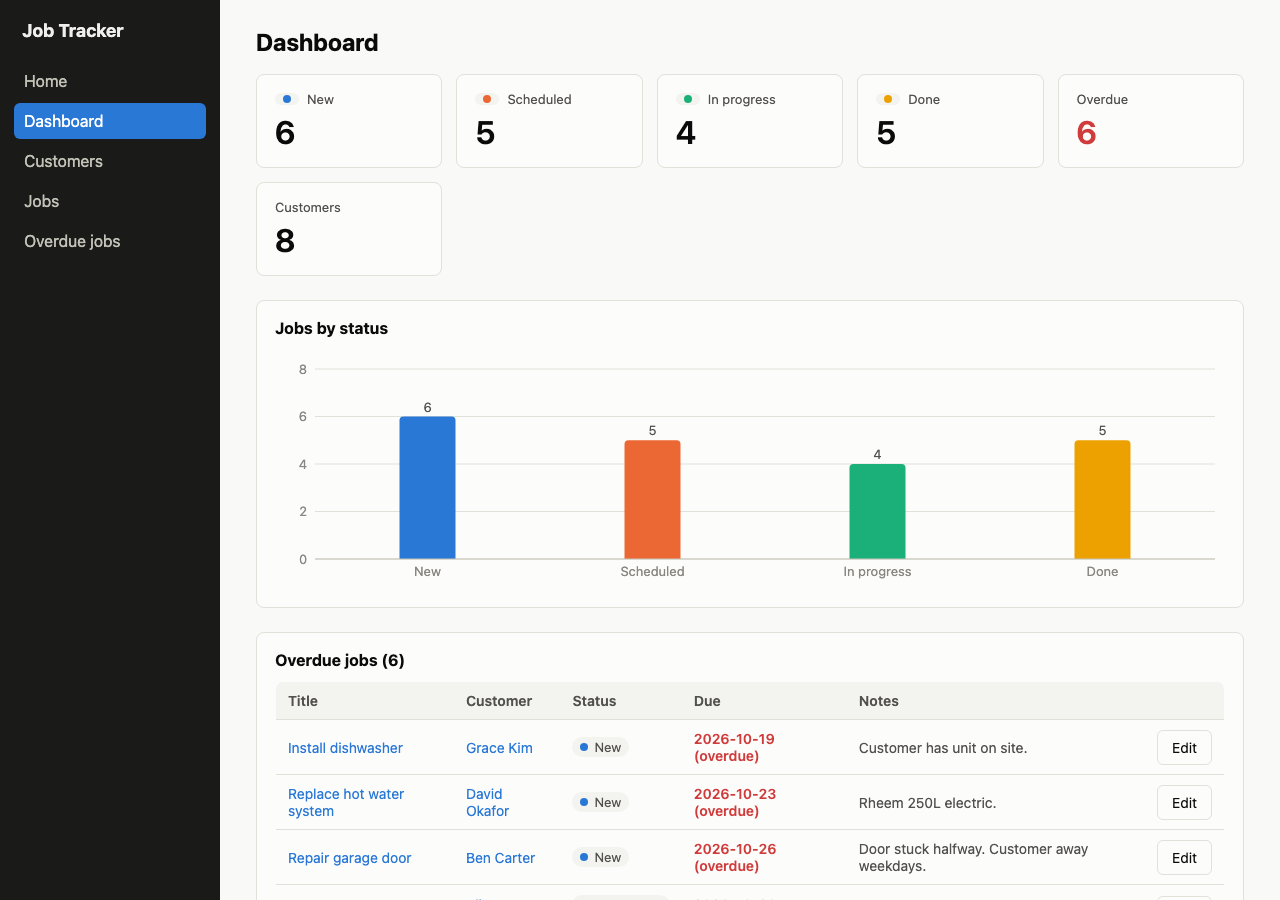
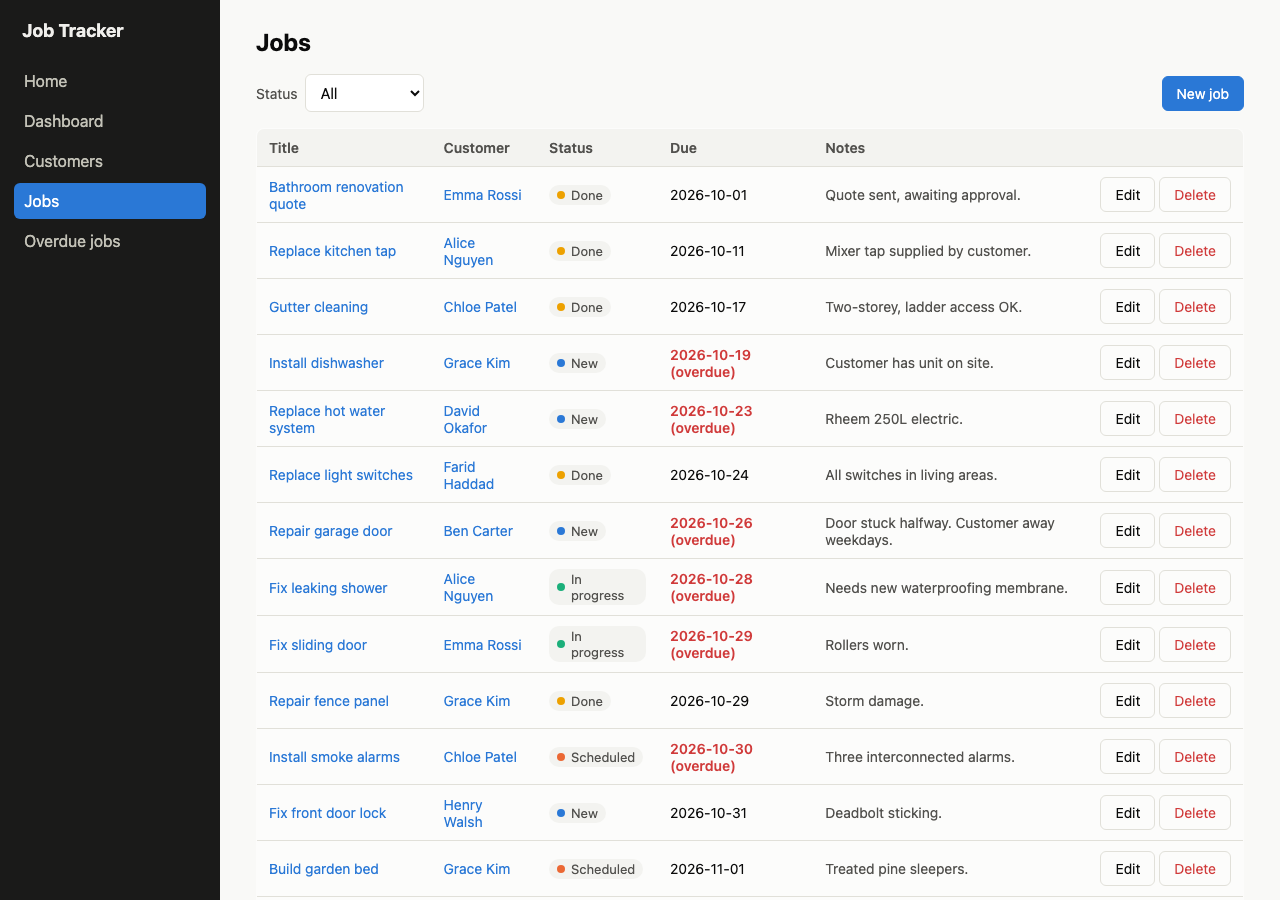
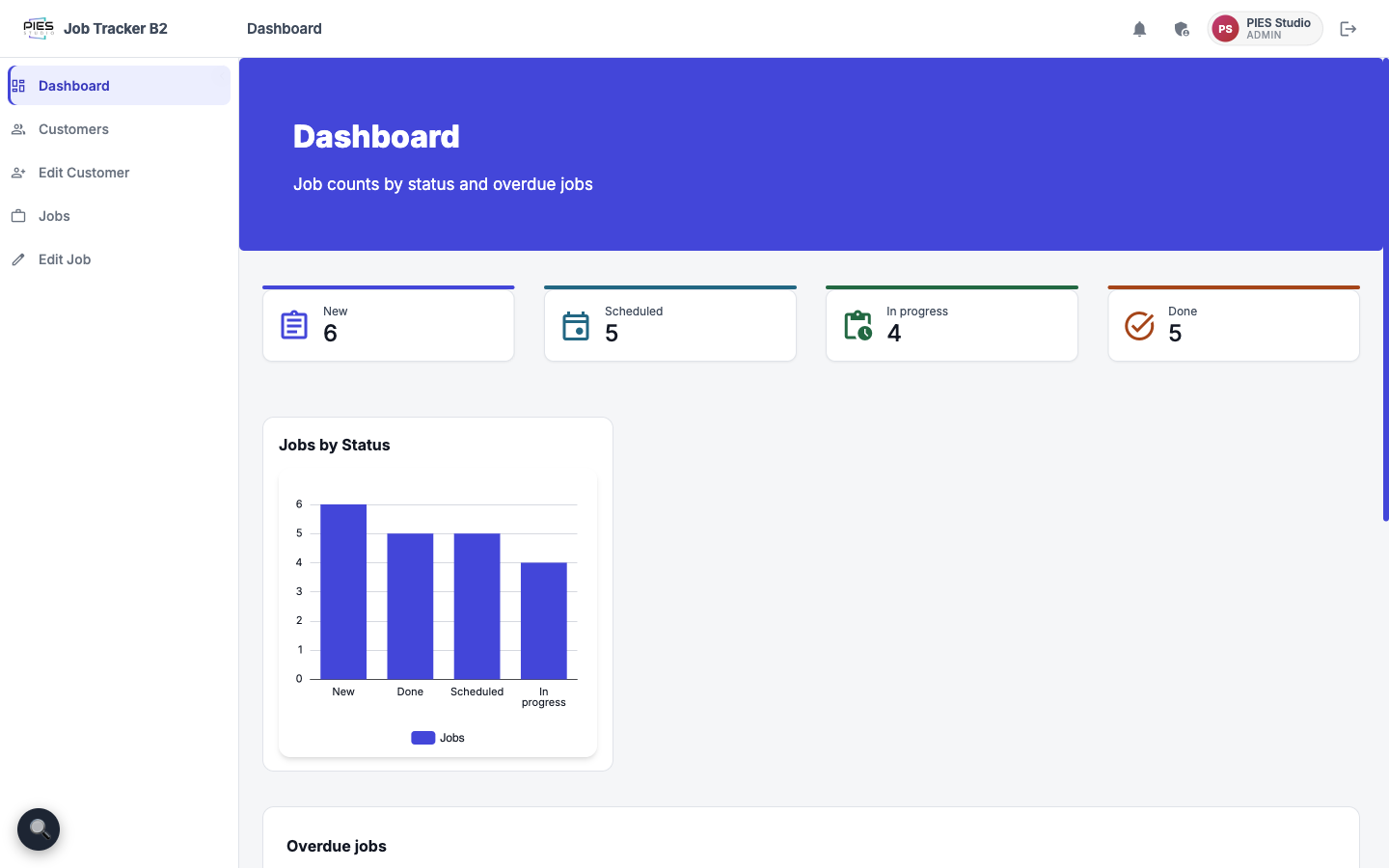
The agent writing the code. 983 lines of Go, JSX and SQL. Sign-in works, all seven screens render from the left menu, the dashboard tiles are right (New 6, Scheduled 5, In progress 4, Done 5), the overdue table shows customer names, and MySQL holds 8 customers and 20 jobs. Everything the brief asked for works.
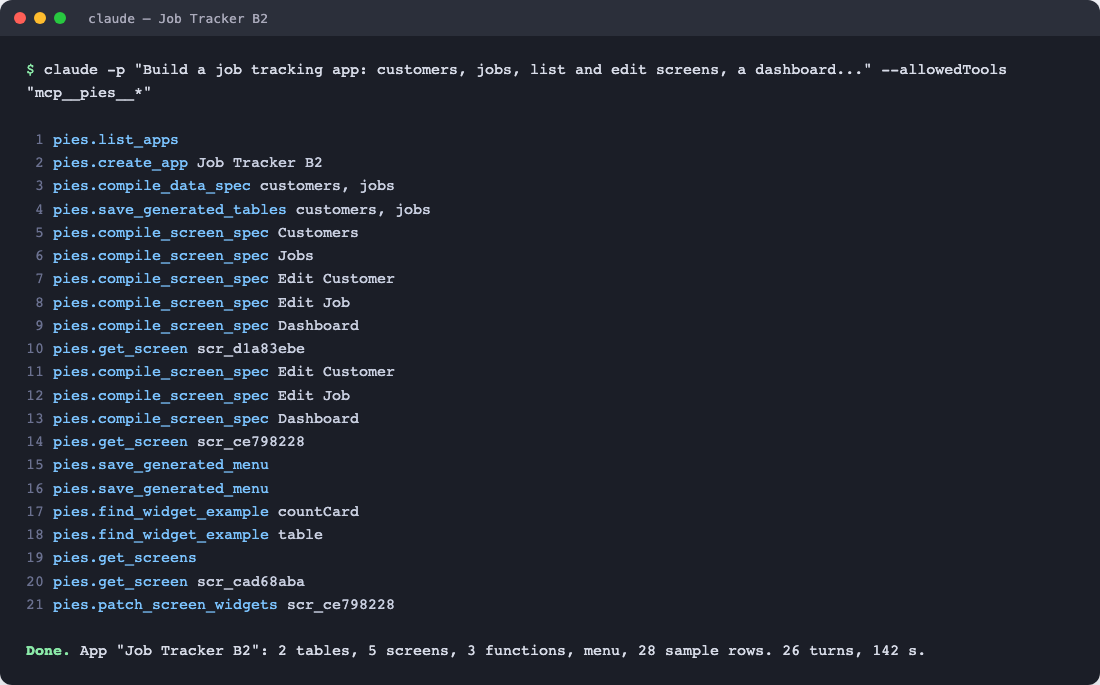
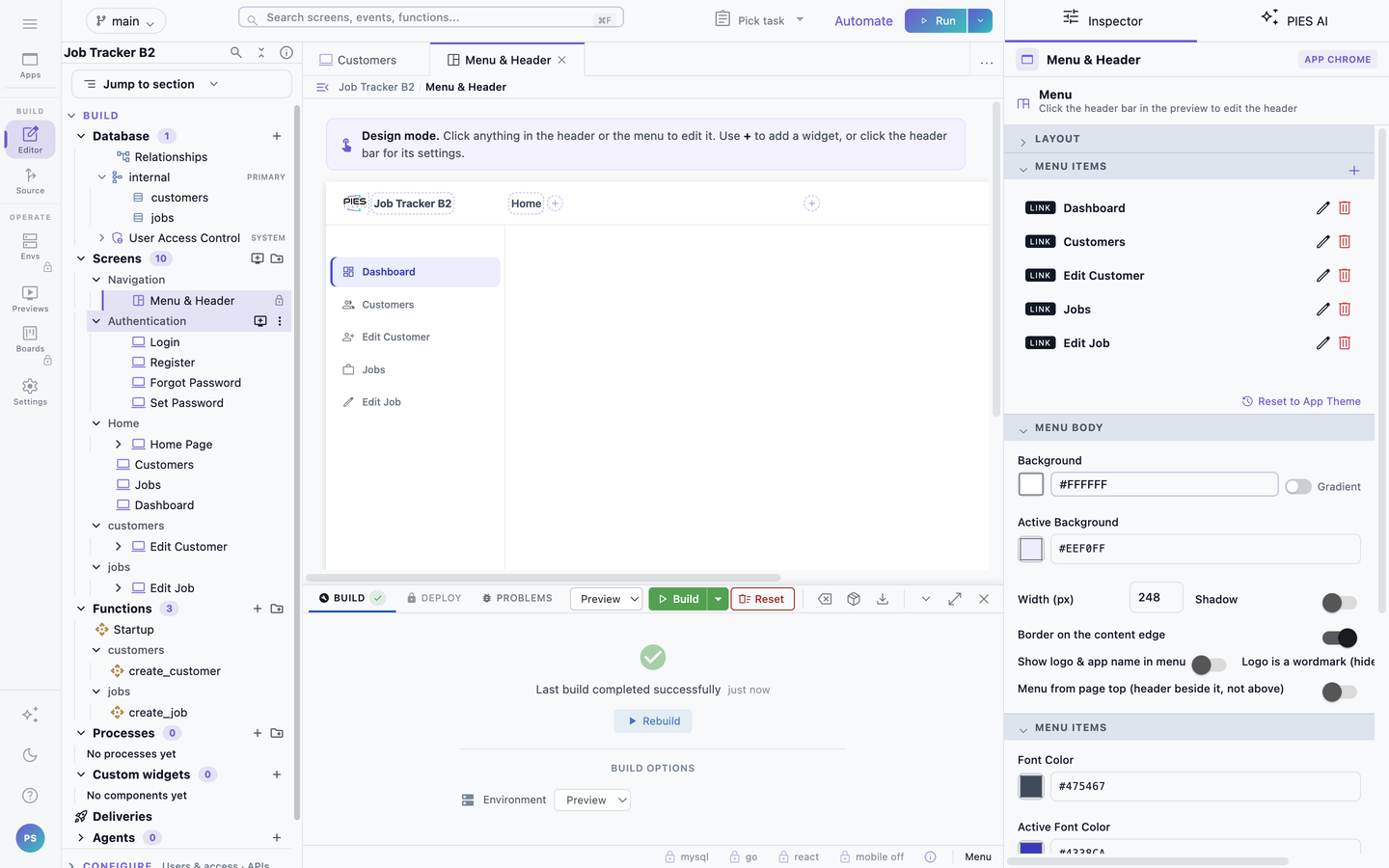
The agent building through PIES. In Studio: Tables customers (8 rows) and jobs (20 rows); Screens Customers, Jobs, Edit Customer, Edit Job and Dashboard, plus the standard sign-in screens; Functions Startup, create_customer and create_job; five Events; a menu. The preview built in 10 seconds and the running application signs in with PIES Studio.
The gaps in our own result
Two things are wrong in the PIES build, and one is a difference you should know about.
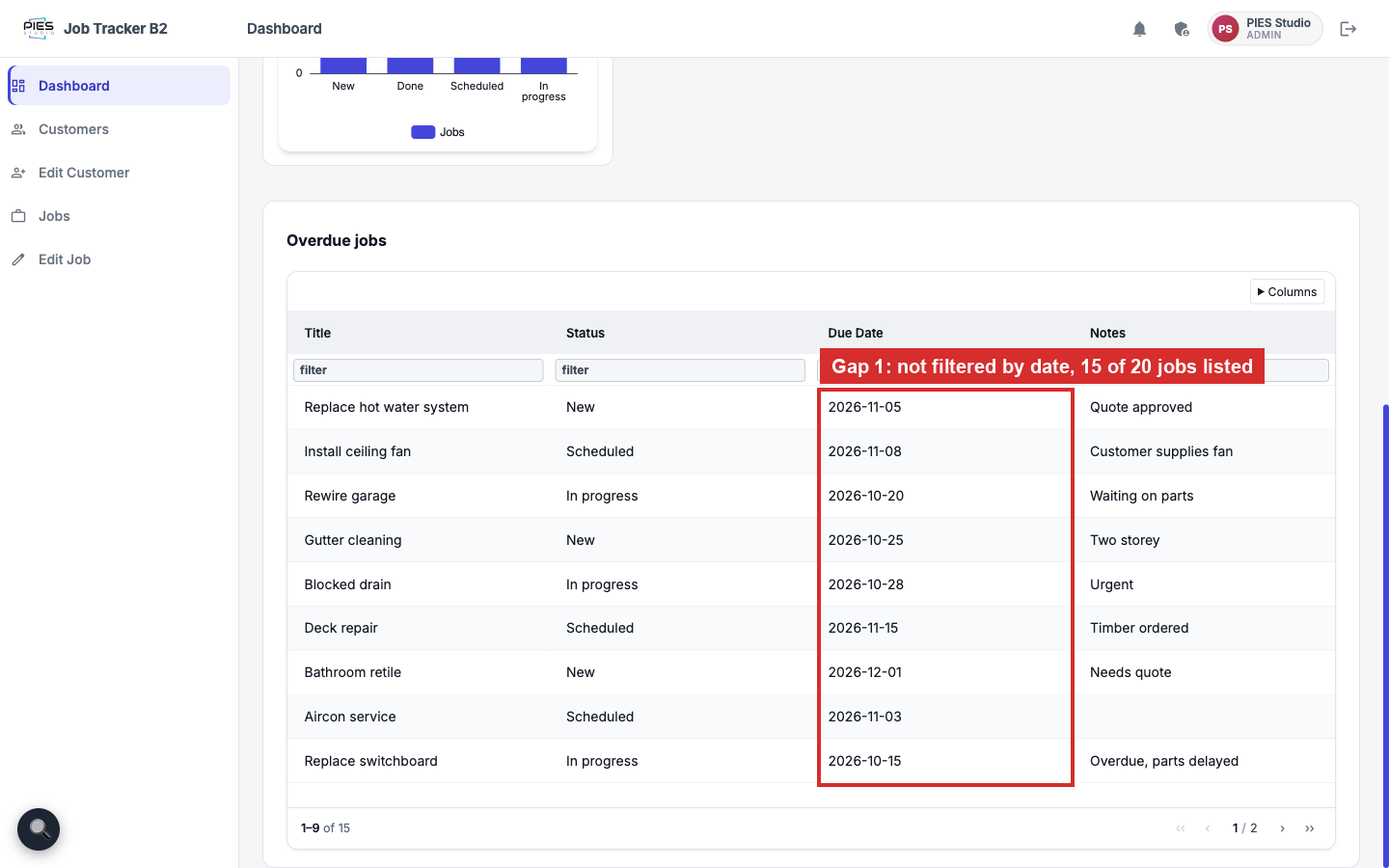
- The overdue table is not filtered by date. It lists 15 of the 20 jobs, including some due in late November and December. The "not Done" condition applied; the "due before today" condition did not. The agent's own closing note says the compiler dropped its filters and it patched them by hand, and the patch missed this one.
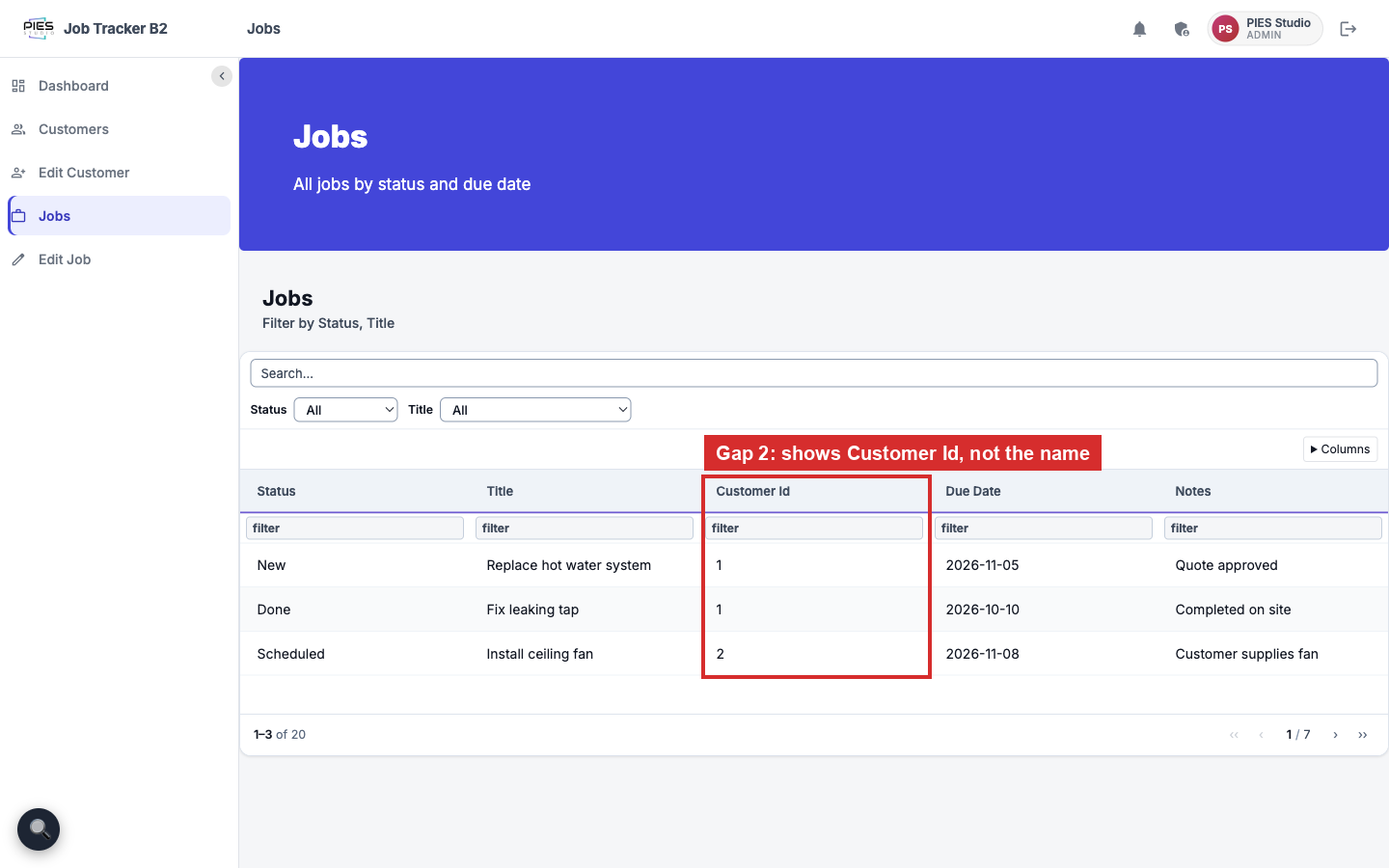
- The jobs list shows Customer Id, not the customer's name. A one-table widget in PIES does not join to another table, so the agent left the id column in place.
- Five custom screens, not seven. The agent folded the overdue list into the Dashboard and let the list and edit screens share forms. Screen for screen, the plain build is more complete.
Fixing the two gaps in Studio takes a few more agent turns or a minute by hand. We did not do that before measuring, because the point was to measure one run as it came out.
Why the token count drops, and why cache reads do not
The saving is in output tokens. Through PIES the agent sends a table spec of a few hundred characters and PIES generates the schema, the Functions and the Screens deterministically. The agent still has to read results back and decide what to do next, so it takes a similar number of turns, but each turn writes about half as much: 433 output tokens a turn against 803.
Cache reads did not drop. Every turn re-reads the conversation so far plus the list of tools the agent can call. The Studio MCP server exposes 109 tools, and their descriptions weigh about as much as the code the plain run had to read back. So the schema overhead was matched, not removed.
That is what we are changing next (tracked as PV-4489):
- A one-call build. The agent hands PIES a structured brief in a single call. PIES runs the whole build on your computer and returns a summary. The agent's turns drop to a handful whatever the size of the application.
- A smaller tool list for agents. About fifteen tools with short descriptions instead of the full authoring surface, so each turn carries less.
- Batch writes. Several tables or screens saved in one call.
- Earlier checks. A widget bound to a column from another table is refused when the screen spec is compiled, not ten minutes later when the preview builds.
When those land we will run the same brief again and publish the new pair beside this one.
How to reproduce it
- Install PIES Studio Hobby and open it. See PIES Studio Hobby.
- Connect Claude Code to the Studio MCP server:
claude mcp add --transport sse pies http://127.0.0.1:19085/sse
Or install the plugin, which also adds the /pies-build and /pies-run commands: see Build with Claude, OpenAI or Cursor.
- Run the PIES build headless so the usage is reported:
claude -p "<the brief above>. Use the pies tools." \
  --allowedTools "mcp__pies__*" --output-format json > via-pies.json
- Run the plain build in an empty folder with no MCP servers and the stack pinned:
claude -p "<the brief above>. Stack: React front end, Go REST backend, MySQL. Seven screens: ... Start it and confirm it serves." \
  --strict-mcp-config --mcp-config '{"mcpServers":{}}' \
  --allowedTools Bash,Read,Write,Edit,Glob,Grep --output-format json > plain.json
- Read
usage,total_cost_usd,num_turnsandduration_msfrom both files, then open every screen of both applications and check the counts.
What we have not measured
- Other agents. Only Claude Code so far. The mechanism is the same for any agent that speaks MCP, such as Codex CLI, Gemini CLI or Cursor, but we have no numbers for them yet and will publish each pair as we run it.
- Subscription quota. We have list-price cost from the CLI, not how far a Pro or Max plan's limits stretch. Do not read the cost column as a bill.
- Variance. One run each. Agent runs vary, and a second pair could move any number here by tens of percent.
- First builds. The PIES preview was an incremental build of ten seconds. A first preview build on a fresh install installs packages and takes several minutes.
- The small offline model. PIES Private AI Micro (Preview) took no part in either run; the agent's model did all the thinking.
Related: Build with Claude, OpenAI or Cursor · PIES Studio Hobby · Build with AI