PIES Studio 1.9 · Documentation
PIES Studio Hobby
Hobby is the free plan: the complete PIES Studio editor, running on your own machine. No account, no sign-up, no telemetry. Download it from pies.io/download and start building.
It is not a trial and it does not expire. Editing, building and previewing are free permanently.
Installing it
| System | Download | Notes |
|---|---|---|
| macOS (Apple silicon or Intel) | .dmg | Open it and drag PIES Studio to Applications. |
| Windows (64-bit) | -setup.exe | The Windows installer is not code-signed yet, so Windows may warn about an unrecognised app: see Installing on Windows. |
| Linux (x86-64) | .deb or .AppImage | sudo apt install ./PIES-Studio-<version>-amd64.deb, or make the AppImage executable and run it. On a Linux desktop with no keyring service, your local sign-in token is kept in a file only your user can read. |
Installing on Windows
The Windows installer is not code-signed yet. When you open it, Windows may show Windows protected your PC and offer only Don't run:
- Click More info. The publisher shows as Unknown publisher.
- Click Run anyway, then follow the installer.
Before you run it, you can check that the download is exactly the file PIES published. The release notes list a SHA-256 checksum for every download. In PowerShell, in the folder you downloaded to:
Get-FileHash .\PIES-Studio-<version>-setup.exe -Algorithm SHA256
The hash it prints must match the one in the release notes, letter for letter (case does not matter). If it does not match, delete the file and download it again. On macOS or Linux, shasum -a 256 <file> does the same check.
There is nothing to sign up for: the first launch creates a local account on this machine and opens the launcher. Everything the editor needs ships inside the download — the fonts and icons, the build toolchain, and the full template gallery — so it looks and works the same with no network at all.
What you get
The whole editor. Not a cut-down version — the same application it ships in every plan. The canvas, the explorer, the data model, events and functions, screen design, the build console and the local preview all behave exactly as the user manual describes. When a preview opens in your browser, Sign in with PIES Studio signs you in straight away as your own local account, the app's owner and administrator, without asking for a password.
Unlimited applications and unlimited builds. Nothing counts how many you make.
PIES AI, on your own machine. Hobby includes PIES Private AI Micro, a small model that runs on your computer and is free. In AI Settings it is the one AI control: turn Micro on or off, download the model once, and see its status and what your machine needs to run it. Your prompts never leave the device. The AI chat chip reads PIES Private AI Micro. Micro works on one thing at a time — a screen, a table, a form; asking for a whole application shows what PIES Enterprise and PIES Cloud add. Micro works in the chat's normal Edit automatically mode, so a prompt such as "Create a data model for hospital management" creates the tables straight away. When your app's chatbot asks Micro how many records there are, Micro counts them in your data and the answer always states the exact number, as a direct sentence such as "There are 10 sites that are down right now." The same holds in the editor's AI chat: ask a question about your app's data, such as "How many jobs are awaiting parts?", and Micro reads the data before it answers. If it cannot read the data, it says so and does not guess a number.
Cloud models (OpenAI, Anthropic, xAI, Azure) and the larger PIES Private AI Lite and Ultra are shown below the Micro card as cards with an Enterprise and a PIES Cloud chip. There are no key fields, no routing and no Force one model on Hobby: these models work only when the desktop is connected to an Enterprise server (Connect to a server) or signed in to PIES Cloud, and then the server's policy chooses the model and the chat chip shows the model it routed to. Enterprise explains how to connect to a server; PIES Cloud opens the PIES Cloud page. Asking for a cloud model on Hobby offline is refused with that same explanation, never a prompt for a key.
A real database and a real build. Hobby carries its own stack — database, back end and the build toolchain — so a machine that has never been online can create an application, build it and run it with real data behind it.
The very first build on a machine downloads the application's packages, and later builds reuse them. If that first build runs with no internet, the install stops after five minutes and the build console says Dependency Install Timed Out: connect once, build any application, and from then on new applications build offline too.
Your code, free to take. In the build console, Download Code saves your application's generated source — the React front end and the Go back end — as a .zip. Preparing the code can take a few minutes for a large application, so a message says Preparing your application code... straight away and shows the progress, and the button is disabled until the export finishes. When the file is saved the message reads Downloaded followed by the file name; if the export fails, the message says why.
Air-gapped if you want it. There is no account and nothing phones home, so Hobby runs on machines that cannot reach the internet at all, AI included: PIES Private AI Micro answers from your own machine.
What it looks like
Hobby opens on the launcher rather than straight into an editor. The version pill reads HOBBY, and the line beneath it says you are working offline and under what local identity. Connect to a server is the one link that changes that.
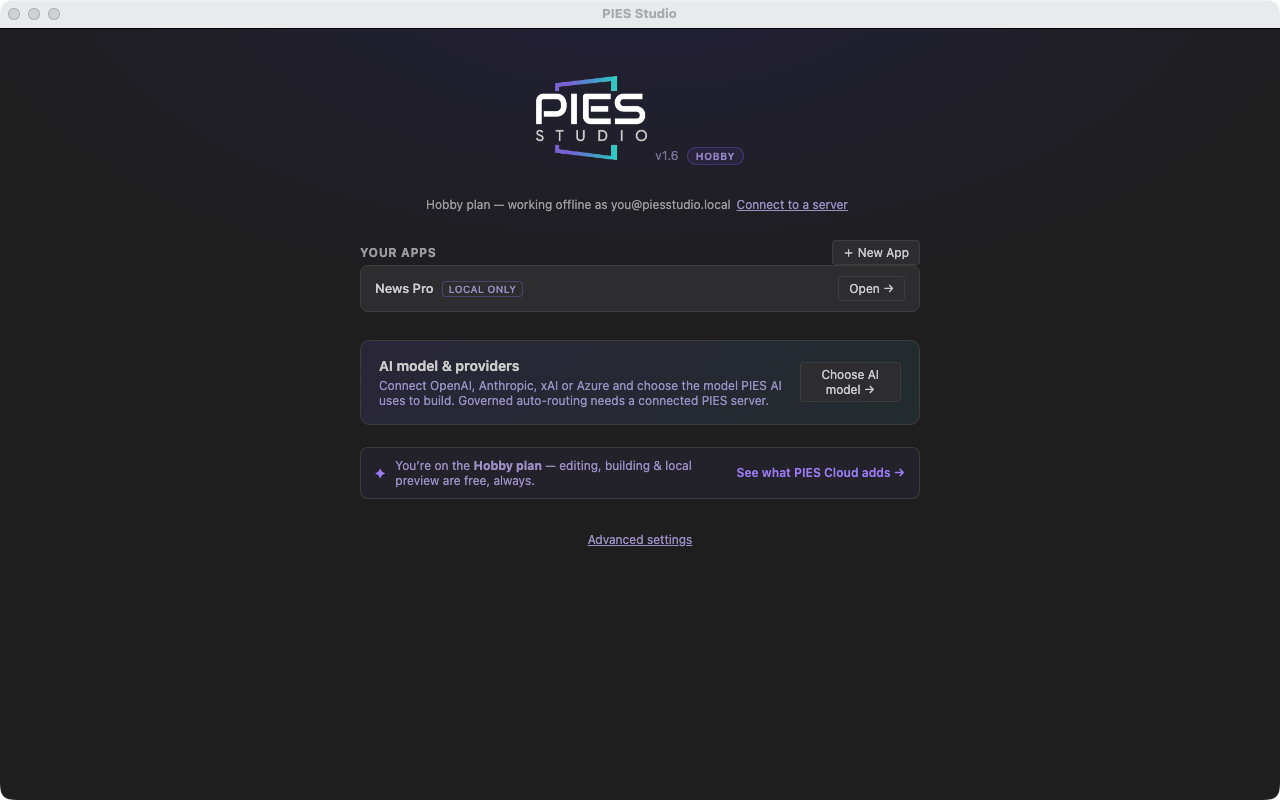
Your applications are listed here, each marked LOCAL ONLY — they live on this machine and nowhere else. Below them sit AI model & providers, where you turn on PIES Private AI Micro, and Advanced settings.
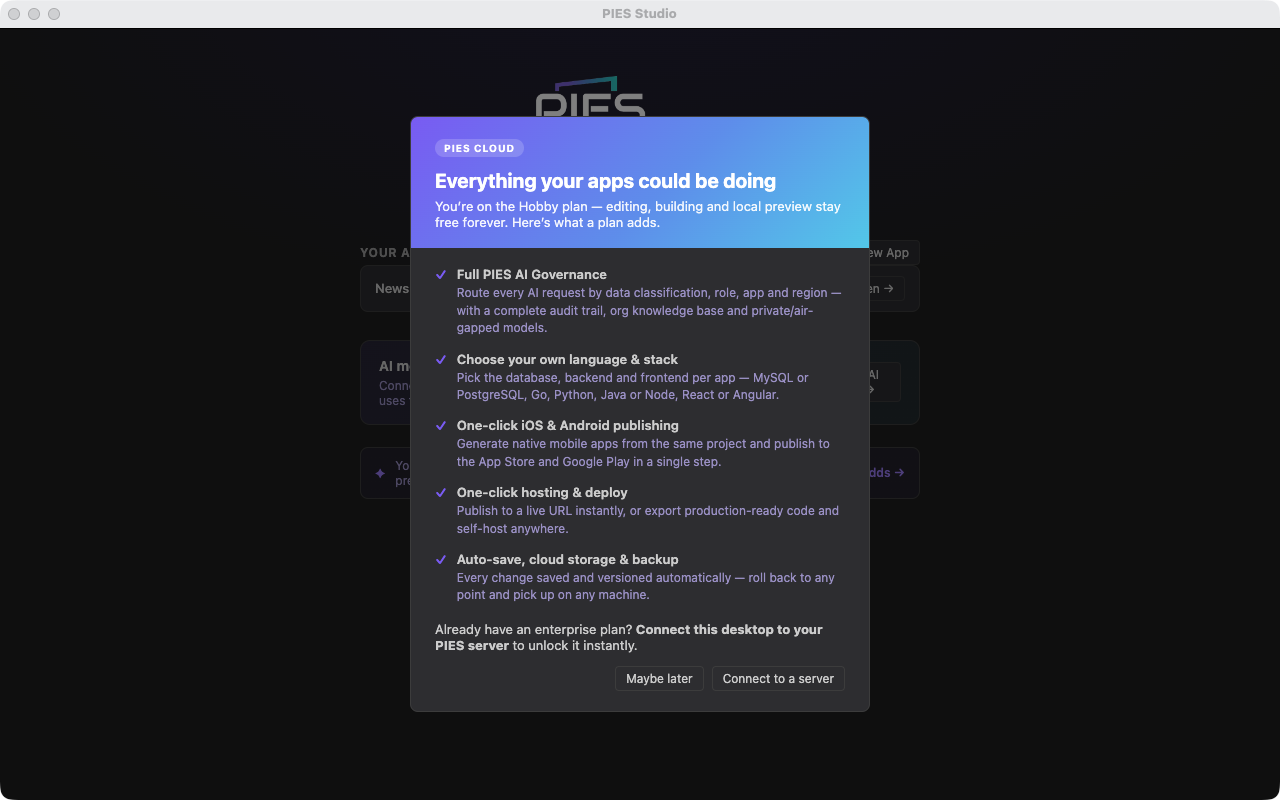
The strip at the bottom states the plan plainly: editing, building and local preview are free, always. See what PIES Cloud adds opens the full list.
Inside the editor nothing is missing — the canvas, the explorer, the data model, the build console and PIES AI are all there.
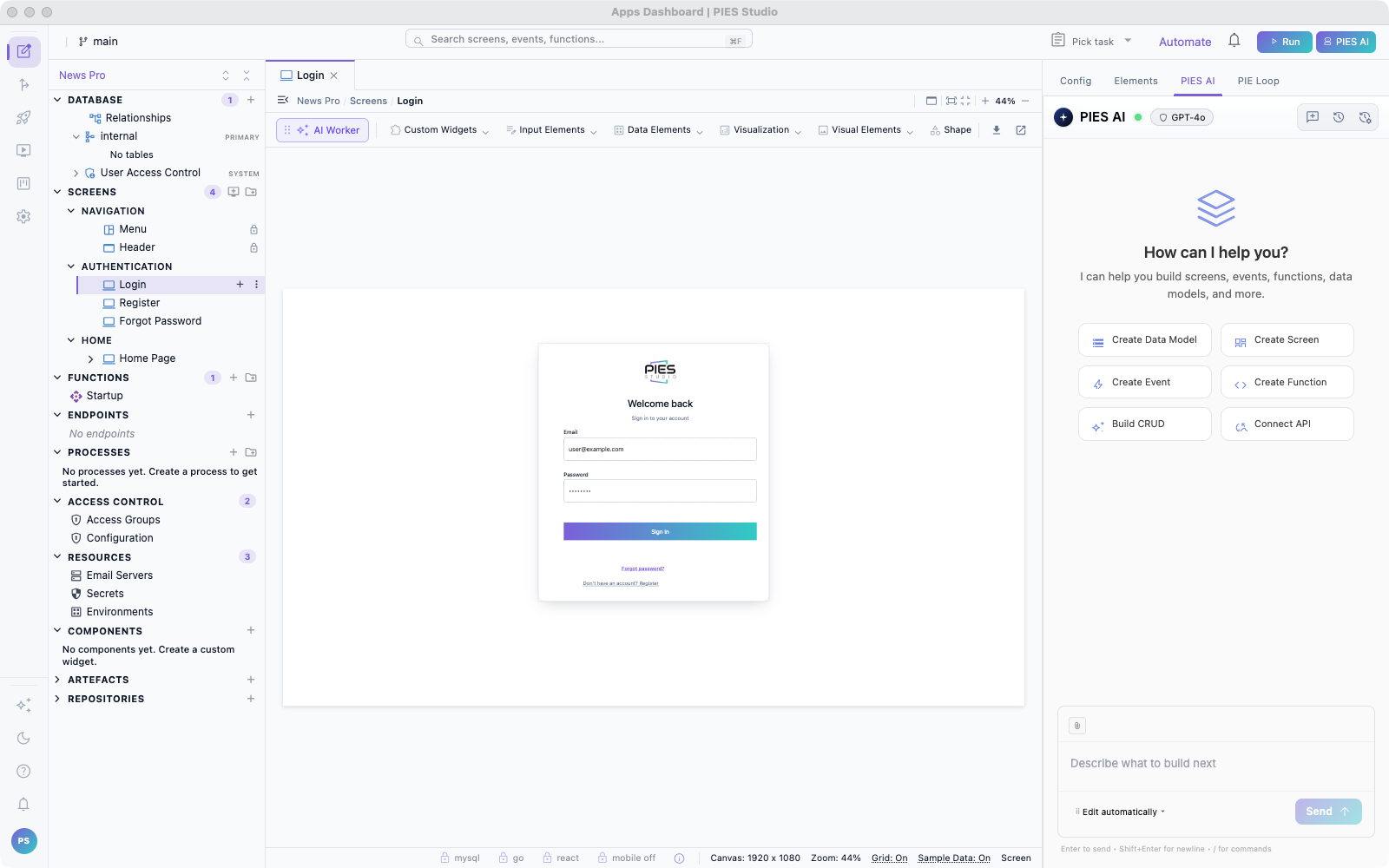
The locked features are visible rather than hidden. The status bar shows the stack it will build on — MySQL, Go, React — with a lock on each, and the mobile toggle reads mobile off.

You can see what you are not using, which is the point: nothing is disguised as absent, and clicking a lock explains what unlocks it.
The same goes for Admin. Team and server features — Deployments, Teams, single sign-on, source control, inviting users — stay in the menu with a padlock and an Enterprise tag beside them, so you can see at a glance why they are locked. Clicking one explains what unlocks it rather than opening an editable form. The AI agent features — Agents, Playbooks and Activity — are locked in the sidebar too, with just a small padlock beside the full name (its tooltip says it is an Enterprise feature). Clicking one explains what unlocks it, and opening one by its address shows an upgrade page with See plans & upgrade instead of the feature. Settings that only exist on a server (organisations, server administration tabs) are left out of the desktop altogether, since there is nothing on this machine for them to manage.
What is locked, and why
Everything Hobby cannot do is something that needs a server somewhere. The editor shows these with a lock rather than hiding them, so you can see what exists.
| Locked on Hobby | What it needs |
|---|---|
| Hosting and deployment | Somewhere for the application to run once it leaves your machine. |
| Choosing your language and stack — PostgreSQL or MySQL; Go, Python, Java or Node; React or Angular | Hobby always builds on the default stack. |
| iOS and Android publishing | A build and signing pipeline outside your machine. |
| Teams, boards and releases — adding team members, project boards | Shared state between people. |
| AI agents — Agents, Playbooks and Activity | The Enterprise plan: somewhere for the agents to run once they leave your machine. |
| Auto-save, cloud storage and backup | Storage that is not your local disk. |
| Full AI governance — routing by data classification, role and region, audit trail, org knowledge base | The Enterprise plan: an organisation to govern, and a server to enforce it. |
The locks are enforced by the services Hobby runs on your machine, not just by the editor, so calling them another way gets the same answer.
Nothing you build on Hobby is held back by those locks. The application definition is the same one a paid plan uses; connecting later unlocks these features against work you already did offline.
Moving to a paid plan
There is no migration or conversion step. The IDE is the same download in every plan.
Individual and Teams run in PIES Studio on a PIES-operated server, in the browser. You get hosting, storage and backup, stack choice, mobile apps, and — on Teams — boards, shared source control, roles and single sign-on. PIES Cloud is not open yet, so the Hobby home screen does not show a Sign in to PIES Cloud button; it appears in a later release when PIES Cloud launches. Connect to a server is still there. Until then, View plans & upgrade and the other upgrade buttons in the desktop open the pies.io pricing page, which lists every plan.
Connecting the desktop to a PIES server on a paid plan unlocks the locked features in the desktop, against work you already did offline.
Enterprise connects the editor to a server your organisation installs and controls: your infrastructure, your database, your identity provider, your audit trail. This is also the only plan where the AI engine can run inside your own network, so no prompt and no application content ever crosses your boundary. See the installation guide and the PIES Private AI manual.
For current plans and pricing, see pies.io. To start an Enterprise trial or buy a licence, see Getting a licence.
Common questions
Does Hobby expire, or watermark what I build? No. It is free permanently and adds nothing to your application.
Can I use it commercially? Nothing in the software restricts it. Check the licence terms for the current position.
Is my work locked in? No. PIES Studio generates ordinary source code — an application you built on Hobby is a real codebase, not a proprietary artefact. Hobby can download the full generated source (the front end and the back end) at no cost, so you can read it, keep it or run it yourself. Hosting it from PIES Studio is part of a paid plan.
Do I need a GPU for the AI? No. PIES Private AI Micro runs on an ordinary computer; AI Settings shows what it needs. The larger PIES Private AI Lite and Ultra, and cloud models, come with an Enterprise server or PIES Cloud (see the Private AI manual). With a local model, Hobby runs one AI build at a time: if you start a second, it waits for the first to finish rather than slowing both down. If the connection to the build drops part-way (a network blip, or a long build), the chat reconnects to the build still running and carries on; and if PIES Private AI stops answering after a build has already made changes, the chat shows Waiting for PIES Private AI to come back… and retries for about three minutes before reporting the build as failed. Each step the local model takes has ten minutes to finish; on a computer too slow for that (below the requirements AI Settings shows, such as a virtual machine emulating another processor), the chat says the local AI model did not finish within 600s. That is not a connection problem: run Studio on a faster computer, or ask for something smaller. Micro uses a 16,384-token context window on any computer with 16 GB of memory or more, with or without a graphics card; with less memory it uses 8,192 tokens, and a chat or playbook delivery that outgrows the window fails straight away with Your message is too long for the model and the token counts, rather than a general error.
What happens if the AI service stops unexpectedly? The desktop app starts it again by itself, usually within a second or two, and the AI carries on working. It does this up to three times in five minutes. If the service stops a fourth time inside those five minutes, the app leaves it stopped and the launcher shows AI service stopped, restart the app: quit PIES Studio and open it again. The editor keeps working in the meantime.
I updated PIES Studio. Where are the apps I made before? They are still there. Your Apps in the launcher lists every application you created on this computer, including those made with an earlier version of the desktop app. If you try to create an app with a name you have already used, the launcher says An app named "<name>" already exists - open it or choose another name. Open the existing app from Your Apps, or pick a different name.
Will my applications still work if I stop paying? Applications already deployed keep running — they are ordinary applications on your own infrastructure. The editor reverts to Hobby: you keep editing, building and previewing locally, and the server-backed features lock again.
Where can I get help? Join the PIES community on Discord to ask questions and share what you are building; help there is from the community and best-effort. The desktop app links to it from Help → Join the PIES Community (Discord) and from Questions? Join our Discord on the home screen. Enterprise customers keep using support@pies.io and the support terms in their contract.