PIES Studio 1.9 · Documentation
The editor: Code and Canvas
Every screen, function and event in the PIES Studio editor can be read and changed two ways: drawn, or written as PiLang code. This page covers how you switch between the two and what helps you while you write. The full tour of the editor is in the user manual.
Design and Code, Canvas and Code
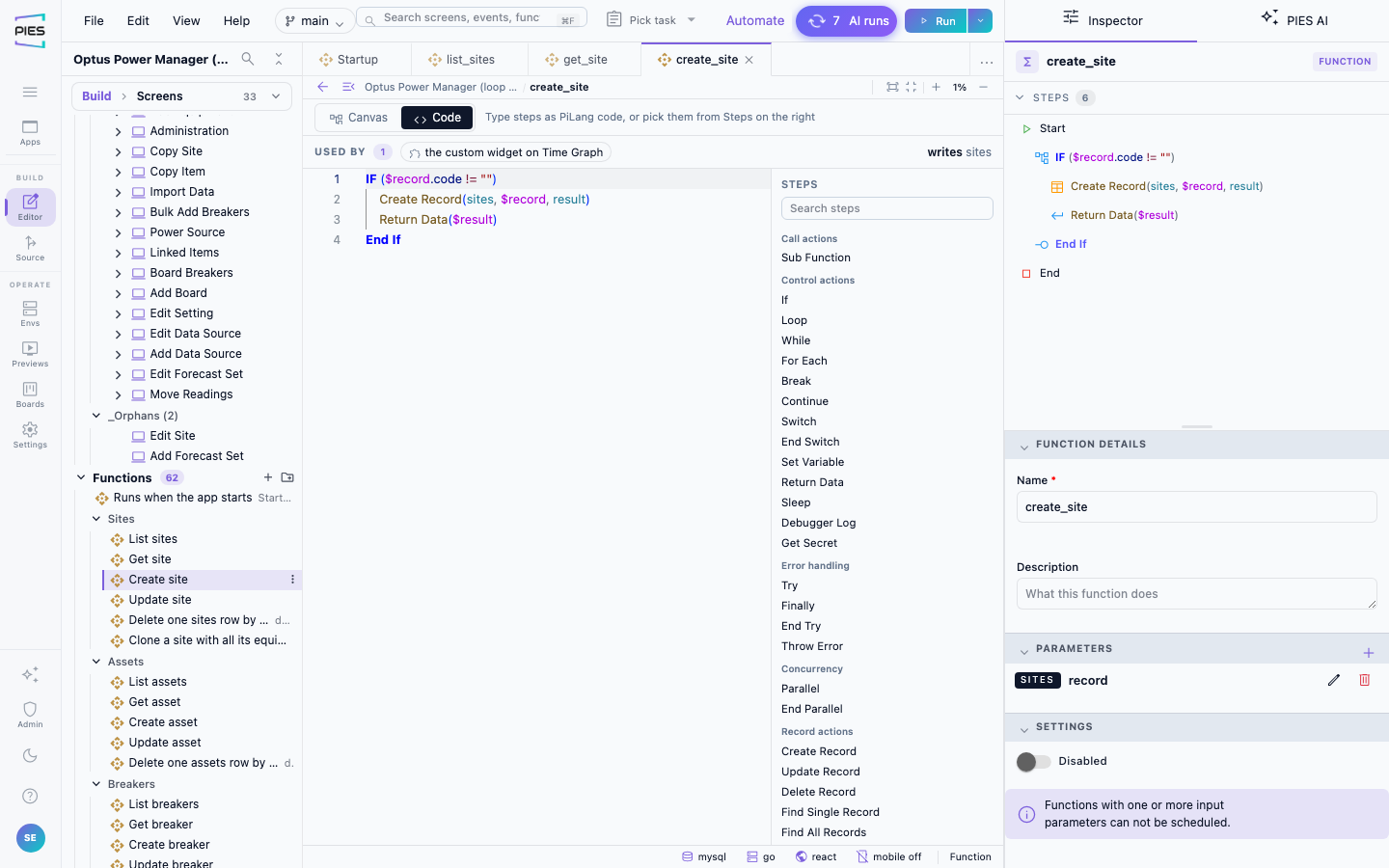
Each editor tab has one view switch in its own toolbar row, at the left, before the palette:
- On a screen tab the switch reads Design | Code. Design is the screen designer you drag widgets onto; Code shows the same screen as text.
- On a function or event tab the switch reads Canvas | Code. Canvas is the flow of steps joined by arrows; Code is the same steps, one PiLang line per step.
Code is always the option on the right. The selected option is shown as a filled segment, each option has an icon and a label, and its tooltip shows the keyboard shortcut. The tab remembers your choice for that kind of tab, so the next function you open comes up in the view you used last.
Both views edit one draft. A change in Code shows on the canvas or designer when you switch back, and the reverse; nothing is saved until you save the tab, the same as any other edit.
Writing in Code
Code is a text editor. Click anywhere and type: one step per line, written as the step's name with its arguments in brackets, such as Create Record(assets, $record, result), and blocks indented by four spaces:
IF ($record.site != "")
    Create Record(assets, $record, result)
    Return Data($result)
End If
The PiLang reference lists every step and its arguments.
- The Steps palette. Beside the code, the Steps palette lists every step you can use on this tab by its name, such as Create Record, Set Variable or For Each; an event tab lists the event steps, such as Navigate to Screen, Show Message and Set Element Data. Search it by name, and hover a step to read what it does. Double-click a step, or drag it into the code, to insert it with its arguments to fill in.
- Autocomplete. Suggestions open as you type: step names at the start of a line, then what fits the argument you are on — your tables, screens, functions, events and elements,
$values, a table's columns after a dot, operators, andtrue/false/null. Each suggestion carries an icon for its kind, so a function and a step are told apart at a glance. Enter or Tab accepts, Esc closes. - Argument hints. After
(and after each comma, a hint shows which argument comes next. - Marks. A line that cannot be read is marked as an error and changes nothing until it is fixed. A line that reads but is incomplete, such as one naming a table the app does not have, gets a muted note and is still kept.
- Colours. Step names, keywords, text,
$values, operators and comments each have their own colour, in the light and the dark theme.
Functions that use Switch, Try or Parallel blocks open read-only in Code; edit those on the Canvas.
The canvas reads the same words
On the Canvas each node is titled with the step's name and shows its arguments underneath, such as Create Record over (assets, $record, result) — the same words as its line in Code.
The Steps list and the Outline
- The Inspector's Steps list shows one row per step, each row being that step's code line, indented and coloured as in Code, such as
IF ($record.site != ""),Create Record(assets, $record, result)orEnd If. Selecting a row selects the step on the canvas. - The Outline still describes behaviour in plain sentences, such as When clicked, this button: Shows the message "Created.", with the technical name on the right.
Where sentences still appear
PiLang code is the name of a step wherever you edit it. The plain-English sentence for a step appears:
- when you hover a step in Code, a row in the Steps list or a step in the Steps palette;
- in the Outline, under each screen, widget, event and function;
- in Used by and Where used, which list callers in sentences, such as Used by the Save button on Home Page;
- when you ask PIES AI what something does, such as what does this button do: it answers with the Outline's sentences word for word.